How to Play Gilla VR
To play Gilla VR, download it free from the Meta Horizon Store on a Meta Quest 2, Quest 3, Quest 3S or Quest Pro, then open it and join a room. You move with your arms, not a thumbstick: push off the floor to run and push off the walls to turn and climb. Your first run should be The Base, the main mode, where you loot gold bars and diamonds and carry them back to the recycler while the monsters listen for your voice.
Quick start: Gilla VR is free. You need a Quest headset, an internet connection, and room to move. It does not run in a web browser.
Watch Gilla VR gameplay
Watch a Be the Monster round before you play one: the monster hunts the lobby while players run, climb and try not to make a sound. It shows the arm-swing movement, the sonar ping and the two-minute hunt better than any description.
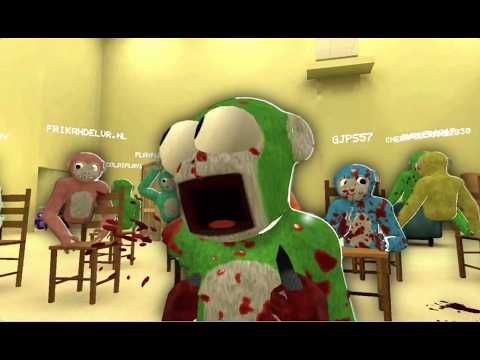
Uploaded by a Gilla VR player. Watch on YouTube
Download and set up Gilla VR
- Charge your headset and clear a space to play in. Gilla VR is played standing or in room-scale, and arm-swing movement is fast, so give yourself room.
- Open the Meta Horizon Store on your headset and search for Gilla.
- Download Gilla VR. It is free, and the download is the full game in Early Access.
- Open the game. An internet connection is required, because Gilla VR is multiplayer.
- On the lobby computer, choose your fur colour. Everyone in the room sees it.
- Join a public room to jump straight into a busy game, or type a code on the lobby computer to open a private room for your friends.
Gilla VR is in Early Access, so the game is still being built and will change with updates. If something looks different from this guide after an update, the version on the official Gilla site is the one to trust.
Gilla VR is Quest-only: there is no PC or Steam version, and Quest Link or Air Link cannot change that, because the game has no PC build to stream. If you were looking for a computer version, see Gilla VR on PC and Steam.
How to move in Gilla VR
There is no walking with a stick in Gilla VR. Your arms are your legs, and the movement is the same idea as Gorilla Tag. Push down on the floor with your arms to run. Shove off a wall to change direction or to get moving fast. Grab and pull to climb. Swing harder to go faster. When something is behind you, your own two arms are all you have got, so practice the push-off in the lobby before your first run. The comfort level is Intense, which means the movement is fast and full, and some players feel unwell. Take a break if you do.
How Gilla VR compares to Gorilla Tag
Gilla VR is openly inspired by Gorilla Tag — both games start from the same idea: you are an ape, and your arms are your legs. If you have played Gorilla Tag, Gilla VR will feel familiar within minutes. The differences are what make it a different game:
- Movement: both games move the same way — no thumbstick, push off the floor and walls with your arms to run, climb and leap. Gilla VR adds horror to it: you do the same running while something hunts you.
- Price: both are free on Meta Quest. The difference is on PC: Gorilla Tag has a paid PC VR version on Steam ($19.99), while Gilla VR has no PC or Steam version at all.
- What you do: Gorilla Tag is a social game of tag and chase. Gilla VR is survival horror: you loot an abandoned base, carry gold and diamonds back to the recycler, and avoid monsters that come to the sound of your voice.
- The monsters: Gorilla Tag has no monsters. Gilla VR has three — the Grinner, the Mannequin and the Mako — and Be the Monster turns one player into the hunter. Meet them on the Gilla VR monsters page.
- Where to play: Gilla VR is Meta Quest only. Gorilla Tag is on Quest and on Steam for PC VR.
Your first run in The Base
The Base is the main mode of Gilla VR and the best place to learn the game. Explore the abandoned base with the other players in your room. Hunt for gold bars and diamonds, pick them up, and carry them back to the recycler. Smash windows and open hazard doors on the way to reach new rooms. Somewhere in the base there is a keycard on a desk. Find the keycard, take it to the reader, and it opens the locked door. Then climb down, if you want to, and see what is underneath.
Do not try to do everything on your first run. Learn the way back to the recycler first, then learn where the loot is, then go for the keycard. The monsters roam the halls while you do all of this, and they can hear you talking, so the quieter your team is, the longer your run lasts.
Voice chat: the rule that gets new players caught
Gilla VR has live voice chat, and your voice comes out of your ape’s mouth in 3D, for everyone in the room. That is also how the monsters find you. The official site puts it plainly: monsters come to the sound of talking, so what you say on voice chat can get you caught. New players get caught because they keep talking while a monster is near. When you are moving through the base, say only what your team needs to hear, and say it quietly. If someone is shouting for no reason, mute them from the leaderboard in the lobby. You can also report a player from the leaderboard or from the Meta menu.
Staying safe while you play
Gilla VR is rated Mature 17+ for intense violence and blood and gore, so it is not a game for younger players. The movement is rated Intense: arm-swing running is fast, and the game warns you to give yourself room and to take a break if you feel unwell. Play in a clear space, keep water away from your play area, and stop if you feel sick or dizzy. Daily quests give you something to come back for, and your level is visible to everyone in the room on the leaderboard.
Tips for your first night in Gilla VR
- Learn the push-off first. Spend your first minutes in the lobby getting the arm run right before you join a run.
- Stay with your team. The base is big, the monsters are fast, and a teammate can see what you cannot.
- Carry loot to the recycler often. Loot in your hands does not count until it is back at the recycler.
- Keep voice chat short and quiet when a monster is near. Talking is the fastest way to get found.
- Learn one route at a time: recycler first, then loot, then the keycard and the locked door.
- In Don’t Splash, keep moving. The platforms sink once you have stood on them, and the water is not a place to wait. Read the Gilla VR Don’t Splash guide before you try it.
- When you are ready to hunt instead of hide, read the Gilla VR Be the Monster guide and use the Gilla VR hunt timer to track the two-minute hunt.